Gryphon Connect
- 3.3
- Rating
- 10.00K
- Installs
- Free
- Price

 Analysis by App-foxy
When I look at Gryphon Connect, I see a companion app built around one clear idea: making a Gryphon mesh WiFi system easier to manage while adding a layer of protection for the home. That focus matters because this is not simply another app for checking whether a router is online. It belongs to the lifestyle category, comes from Gryphon Online Safety, and is aimed at people who want their home network and connected devices to feel more understandable and controlled.
I reviewed it with that purpose in mind rather than treating it like a general internet-speed utility. The strongest part of the experience is the way it brings network protection into an everyday household setting. Instead of leaving security as something hidden inside a router menu, the app presents the home network as something you can actively supervise. The real value is turning network safety into a routine household task rather than a technical project.
The app is free to install, although it includes in-app purchases ranging from $0.99 to $89.99 per item. It is suitable for Everyone, works with Android devices running version 5.0 or later, and the current version is 05.0003.55. Its listing shows a 3.3 average from around 580 ratings, with more than 10K installs, so it has a modest footprint rather than the reach of a mainstream broadband app.
You May Also Like

 AccuWeather: Weather Radar
AccuWeather Review: A Quick, Clear Forecast for Everyday Decisions
For everyday plans, the best forecast is the one you can understand quickly. AccuWeather makes rain timing, radar, and local conditions easy to act on, with a few trade-offs.

 Hill Climb Racing
Why Hill Climb Racing Still Turns Crashes Into One More Run
A tiny car, a bumpy hill and one more upgrade: Hill Climb Racing keeps resurfacing because its simple chaos makes every near-miss feel personal.

 AliExpress - Shopping App
AliExpress Makes Global Shopping Feel Personal, but Shoppers Bear the Risk
AliExpress turns a global marketplace into a pocket-sized discovery engine. Its reach is useful, its shopping loop compelling, and its trade-offs easy to miss.

 Lords Mobile: Kingdom Wars
Lords Mobile Is a Kingdom-Building Routine, Not a Quick Match
A case-by-case verdict on the building, battles, device demands, and social commitments that make Lords Mobile rewarding for some players and exhausting for others.

 PDF Scanner app - TapScanner
TapScanner Makes Paperwork Easier to Capture, Check, and Share
TapScanner makes scanning with a phone feel less like a rescue operation and more like a dependable step in getting work done. Its capture tools are useful, though not flawless.

 Block Blast!
 Shows How Much a Puzzle Game Can Leave Out
A quiet grid game shows why puzzle players increasingly value instant clarity, repeatable skill and low-pressure play—and where the genre still needs to catch up.
More From Our News Desk
View All News


Making home network protection easier to understand
The central capability is the connection between Gryphon’s mesh WiFi hardware and the app’s safety-oriented controls. In practical terms, the app gives the household a place to view and manage the network instead of relying only on a router’s physical indicators or a provider’s basic account screen.
That distinction is important. Typical internet-provider apps concentrate on billing, outages, speed checks, and restarting equipment. A conventional router utility may expose technical settings, but it can feel designed for someone who already understands networks. Gryphon Connect sits between those two approaches. It is more focused on the home environment than a standard provider app, while its safety angle is more approachable than a dense administration panel.
I found that positioning most useful for families with several connected devices. A home may include phones, tablets, televisions, game consoles, smart speakers, cameras, and computers, all competing for attention and access. The challenge is not merely getting them online. It is knowing what belongs on the network, deciding which devices need closer supervision, and having a practical way to respond when something feels wrong.
The app’s purpose is therefore less about replacing every networking tool and more about giving the Gryphon system a central control point. That makes the hardware relationship essential. If you do not use a Gryphon mesh WiFi setup, this is not the kind of standalone safety app that can simply be installed and expected to manage any router. That is the first question I would ask before downloading it.
The safety emphasis also changes how I judge the interface. A technically impressive feature is not very helpful if a parent, roommate, or less experienced user cannot tell what it does. Gryphon Connect makes more sense when the person managing the network wants clear household-level decisions rather than a long list of unfamiliar networking terms.
What the capability changes in daily use
In a normal home, network management is usually reactive. Someone complains that the internet is slow, a new device fails to connect, or a parent notices a child is still online late at night. The administrator then opens a provider app, searches through router settings, or waits for another family member to explain what happened. Gryphon Connect is designed to make that process more direct by keeping the home network and its safety controls in one place.
The benefit is not just convenience. A single control point can improve consistency. If several people share responsibility for the household, they do not need to remember different router addresses, obscure login pages, or separate security tools. The app gives the Gryphon system a more approachable front end, which is especially useful when the person responsible for the network is not the person who originally installed it.
There is also a useful psychological effect. When security controls are visible and understandable, people are more likely to check them. A hidden router setting may technically exist, but it has little practical value if nobody wants to open it. An app designed around home protection encourages occasional review: checking connected equipment, considering whether household rules still make sense, and responding to changes in the home.
I would not confuse that with complete digital safety. A protected home network cannot replace sensible device settings, updated operating systems, careful account passwords, or conversations with children about online behavior. The app can support a safer environment, but it does not remove the need for judgment. That is one of the most important boundaries to keep in mind.
A realistic household workflow
Imagine a family preparing for a new school term. A child receives a tablet, a parent works from home, and the living room gains another streaming device. The network becomes busier, and the adults want to understand what is connected without turning the evening into a technical troubleshooting session. Gryphon Connect gives them a dedicated place to review the Gryphon network and think about how those devices should be handled.
The useful workflow is not necessarily a one-time setup followed by total automation. I see more value in using the app as a periodic checkpoint. After adding a new device, the household can make sure the network still reflects who lives there and what they use. When routines change, the person managing the system has a clearer starting point than calling the internet provider or searching through a generic router interface.
This is also where the mesh WiFi context matters. A household may have weak coverage in a bedroom, a home office, or an upstairs hallway. A mesh system is intended to distribute coverage more effectively than relying on one router, while the companion app provides the management layer. The app does not magically fix every placement problem, but it makes more sense as part of a system designed for a whole home rather than a single box beside the modem.
For a shared house, the same workflow can help establish responsibility. One person can take ownership of the network without needing every resident to understand the underlying equipment. That can reduce the familiar situation where nobody knows which device is causing trouble or who has access to the router controls.
Where Gryphon Connect fits best—and where it does not
I see this section as the decision point: Gryphon Connect makes the most sense when you want a household-oriented way to manage a Gryphon network, not when you simply need a universal WiFi utility. I’d weigh that ecosystem fit against how you actually use your connection, especially if different people in the home depend on it for work, school, and entertainment. That practical question leads naturally to how connectivity shapes the day-to-day experience.
The strongest scenario: a family that wants simple oversight
The best match is a family using Gryphon hardware that wants network safety to be understandable enough for regular use. Parents may not want to study advanced router settings, but they still want a clearer view of the home’s connected environment. For them, the app’s safety-centered approach is more relevant than a basic speed-test application.
It is particularly appealing when children use several devices. A phone, tablet, television, and console can make household internet rules difficult to manage informally. A dedicated management app gives the adults a more structured place to think about access and network behavior. I would recommend it most strongly to households that value visibility and routine supervision over deep technical customization.
Another good scenario is a home where the network has grown gradually. Many people begin with a provider-supplied router, then add smart devices, work equipment, entertainment hardware, and perhaps extra coverage. At that point, the network can feel like a collection of unrelated objects. Gryphon Connect is better suited to bringing that collection under one household-oriented system than to users who only need a quick restart button.
I can also see it helping someone who has become the unofficial technology manager for relatives. A parent, adult child, or technically confident roommate may be asked to keep everything working. A safety-focused app can make routine explanations easier because the conversation is about the home network rather than a maze of router terminology.
The trade-off of choosing a focused ecosystem
The main limitation is the same thing that gives the app its identity: it is tied to the Gryphon experience. If you are shopping for a general network-monitoring tool that works across different router brands, this is not the flexible choice. A provider app may be more appropriate for account support, and a manufacturer-neutral tool may be better for someone managing equipment from several vendors.
There is also a cost decision beyond the free download. The app itself can be installed without an upfront price, but optional purchases may affect the total cost depending on how you use the Gryphon ecosystem. I would not judge the app only by the word “free.” Before committing to the hardware and its connected services, I would check which capabilities matter to your household and whether they fit your budget.
The 3.3 average suggests that the experience will not be perfect for everyone. I would interpret that as a reason to set realistic expectations, not as an automatic rejection. Apps that control home networking can be sensitive to setup details, device compatibility, and the user’s expectations. Someone wanting a polished entertainment dashboard may find the safety-first focus too narrow, while someone wanting household oversight may consider that focus exactly right.
Another trade-off is simplicity versus depth. A friendly control surface is valuable for everyday decisions, but advanced users may want more granular network diagnostics, detailed logs, or configuration options than the app emphasizes. If your priority is troubleshooting unusual routing behavior or tuning a complex home lab, a traditional router administration tool is likely the better companion.
Questions I would answer before installing it
The first question is whether it works with your existing router. My answer is to treat the Gryphon connection as a requirement, not an optional extra. This is a companion for Gryphon’s mesh WiFi system, so people with another brand should look toward their router maker or internet provider instead.
The second question is whether the app is useful without children in the home. I think it can be, particularly for anyone who wants a clearer household network overview or manages many connected devices. However, families are likely to feel the strongest benefit because the safety purpose maps naturally to shared devices, changing routines, and parental oversight.
The third question is whether the free installation means the complete experience costs nothing. It does not necessarily mean that. The app is free, but optional in-app purchases are present, so I would review the available purchase choices before assuming there will be no ongoing expense connected with the features you want.
The fourth question is whether it replaces antivirus software or device security. I would say no. Network-level protection can complement security on phones, computers, and tablets, but it should not be treated as a substitute for keeping those devices updated and using sensible account protection.
The final question is whether it is suitable for someone who wants maximum technical control. In my view, only partly. It is better for clear household management than for detailed network engineering. A more advanced router interface may be preferable if you need extensive diagnostics or specialized configuration.
Small habits that make the app more useful
I would begin by treating the app as a household map rather than opening it only during an outage. After adding or replacing devices, take a moment to make sure the network still matches the real home. This simple habit can make later troubleshooting much easier because you are not trying to remember months of changes at once.
I would also separate network problems from device problems. If one phone behaves badly while everything else works, the issue may be on that phone rather than in the Gryphon system. Conversely, if several unrelated devices struggle at the same time, the network deserves attention. Keeping that distinction in mind prevents the app from becoming a place where every technical complaint is blamed on the router.
For families, I would agree on rules before relying on controls. An app can help enforce a household approach, but unclear expectations create arguments even when the technology works correctly. Decide which devices belong to children, which are shared, and when adults need uninterrupted access for work or emergencies. The app is more useful when it supports a plan that everyone understands.
I would also avoid making changes during a busy moment unless there is a genuine security concern. Network adjustments can affect streaming, calls, schoolwork, and smart-home routines. Reviewing the setup at a calm time gives you a better chance of noticing whether a change solved the original problem or simply moved it somewhere else.
How it compares with familiar alternatives
Compared with an internet-provider app, Gryphon Connect is more centered on the home network as a protected environment. A provider application usually wins when you need billing information, service appointments, or outage support. Gryphon’s companion approach is more relevant when your question is about the devices and people using the network inside the home.
Compared with a standard router utility, it aims to be less intimidating and more household-oriented. That is an advantage for parents and shared homes, but it may feel restrictive to network enthusiasts. Traditional router software often exposes more technical detail, while Gryphon Connect is easier to justify as an everyday safety tool.
Compared with standalone parental-control software, its appeal is that the network and the household context are connected through the Gryphon system. The trade-off is that this convenience depends on choosing Gryphon hardware and staying within that ecosystem. A standalone service may offer broader device coverage across different networks, whereas this app offers a more unified experience for its intended setup.
That comparison makes the buying decision fairly clear. I would not choose it simply because I need any WiFi app. I would choose it because I want Gryphon’s mesh approach and prefer a safety-focused management experience over a generic router dashboard.
Who gains the most from the app
The people most likely to benefit are families, shared households, and less technical users who still want meaningful control over a home network. The app gives them a reason to engage with network safety without requiring them to become networking specialists. That is a genuine strength, and it is more specific than simply saying the app is easy to use.
It is also a sensible fit for someone building a whole-home network around Gryphon equipment and wanting the companion app to be part of the daily routine. The combination makes the most sense when coverage, connected-device awareness, and household protection are considered together rather than as separate purchases.
I would advise advanced users to think carefully before choosing it. If your home includes multiple router brands, complex network segments, or a need for detailed diagnostic information, the focused Gryphon ecosystem may not give you the flexibility you expect. In that situation, a more technical router platform or a broader management tool could be a better investment.
Likewise, someone who only wants to check internet speed or restart a connection may find this app more focused than necessary. Its purpose is broader than a speed test but narrower than a universal smart-home controller. The right user is someone who sees network safety as an ongoing part of managing the home.
My final view after using it
Gryphon Connect makes the strongest case for itself by focusing on one practical problem: helping people manage a Gryphon home network with safety in mind. I like that it treats protection as something a household can actively oversee instead of leaving it buried in technical settings. The approach feels especially useful for families and anyone responsible for several connected devices.
It is not the universal answer for every router, every network, or every technical user. The Gryphon hardware connection, optional purchases, and limited appeal for advanced configuration are important considerations. Still, if you already use or plan to use Gryphon’s mesh WiFi system, the app gives that setup a more approachable control layer and a clearer everyday purpose.
My recommendation is therefore specific: choose it when you want a family-friendly, safety-oriented way to manage a Gryphon network, and skip it when you need a brand-neutral utility or deep networking controls. Used with realistic expectations, it can turn an easily ignored part of home technology into something you can actually review and manage.
FAQs for Gryphon Connect
01What is Gryphon Connect, and what can I use it for?
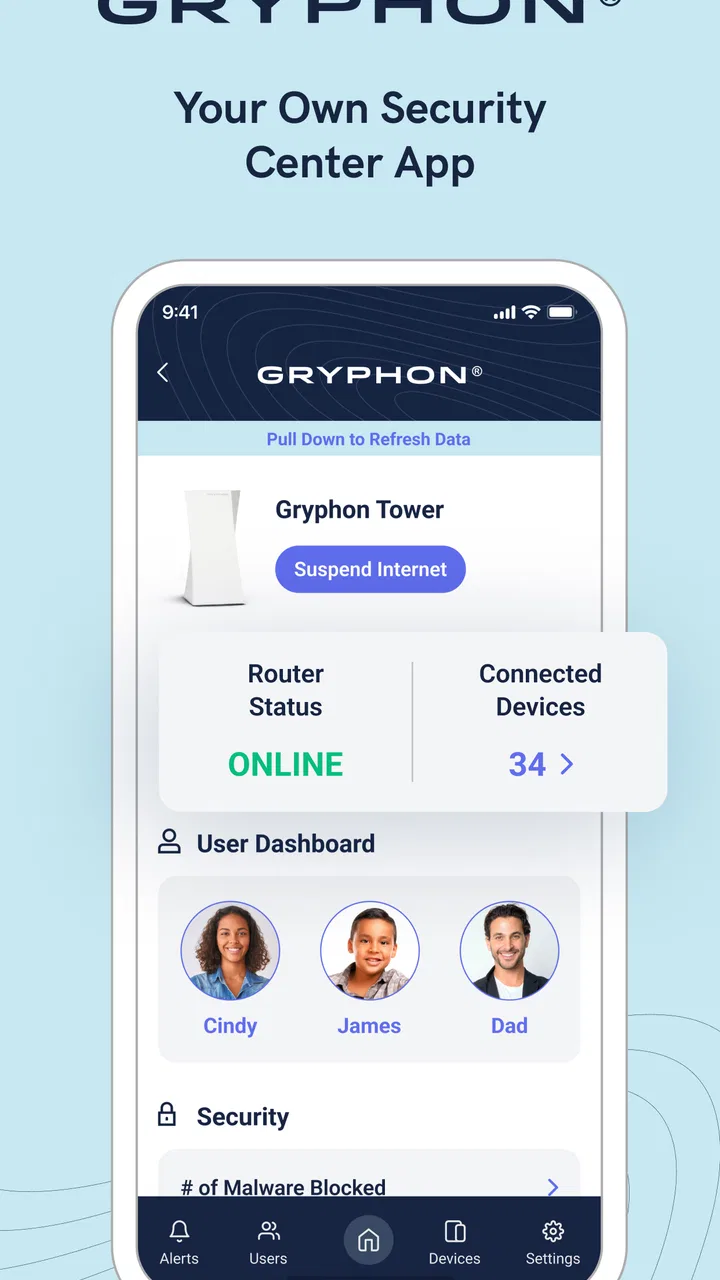
Gryphon Connect is the companion app for Gryphon smart Wi‑Fi routers and mesh systems. After installing it, you can set up and manage your home network, view connected devices, create profiles for family members, pause internet access, and apply security or parental-control settings. The exact features available may depend on your Gryphon router model, firmware version, and subscription plan.
02Is Gryphon Connect easy to set up for someone without technical experience?
The app is designed to guide users through the initial installation with step-by-step instructions. In a typical setup, you connect the Gryphon router to your modem, open the app, create or sign in to an account, and configure the wireless network. Although the process is generally straightforward, modem compatibility, existing router settings, or mesh placement can occasionally require extra troubleshooting.
03Does Gryphon Connect include parental controls and device management?
Yes, one of the app’s main purposes is giving households more control over internet access. You can usually assign devices to individual profiles, set schedules, pause connectivity, and manage content-filtering options. These controls are useful for families, but they should not be treated as a complete replacement for supervision. Some advanced security, filtering, reporting, or profile features may require a paid Gryphon service plan.
04Does Gryphon Connect require a subscription or additional payment?
You can download Gryphon Connect without paying for the app itself, but certain Gryphon products and services may involve hardware costs, optional subscriptions, or recurring security-plan fees. Basic router management may be available with your device, while advanced protection, enhanced parental controls, or additional monitoring can depend on the model and current service terms. Check the app and product listing before purchasing.
05Is Gryphon Connect safe, and what information does it access?
Gryphon Connect needs network-related permissions and account information to configure the router, identify connected devices, provide alerts, and apply security or parental-control rules. Because the app manages your home network, users should create a strong account password, keep the router and app updated, and review privacy settings. Before installation, read the current privacy policy and permissions shown in the relevant Android or iOS store.
Pros
- Simple setup makes it easy to connect and manage Gryphon routers.
- Parental controls allow schedules
- filters
- and user-specific access rules.
- Security features help block suspicious websites and protect connected devices.
- Usage insights make it easier to monitor household internet activity.
- Remote management lets you adjust network settings away from home.
Cons
- Many features require compatible Gryphon hardware to work properly.
- Advanced controls may feel limited for experienced network administrators.
- Some users may find subscription-based features costly over time.
- Performance depends on the quality and placement of the Gryphon router.
- The app is less useful if your home uses equipment from other brands.

Gryphon Connect
Gallery